
Helpful Tips:
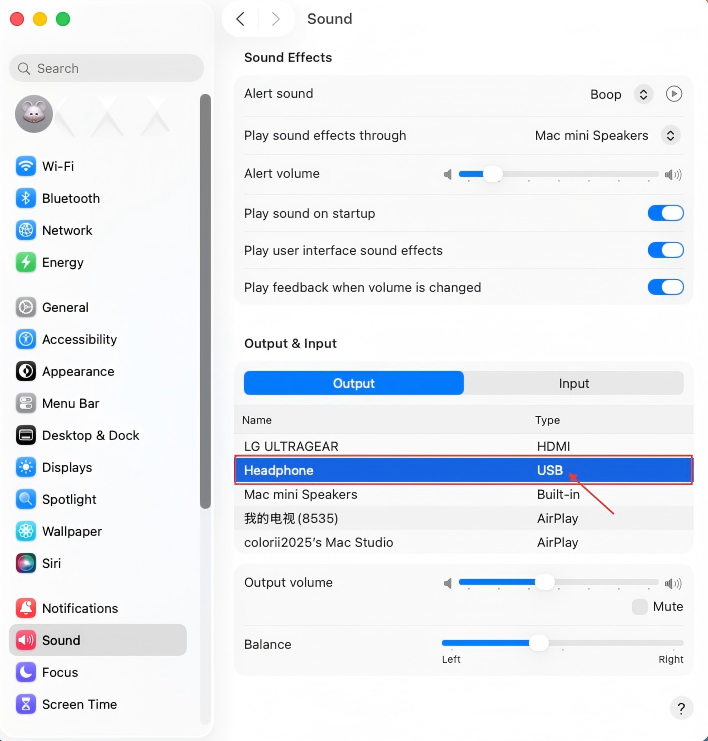
When you connect a headphone, earphone, or speaker with a 3.5mm plug to the audio jack on the rear of the Wokyis, you will need to change the sound output in the settings of macOS. The headphone, earphone or speaker will be recognized as Type of USB in the sound output list in the macOS.
Step-by-step Instructions:
1. Plug in the 3.5mm plug to the audio jack .
2. Click the Apple Menu in the top-left corner.
3. Select System Settings (or System Preferences on older macOS versions).
4. Click on Sound in the sidebar.
5. Click the Output tab at the top of the Sound window.
6. In the list of devices, select the Headphones recognized as Type of USB.
7. The sound should now play through the audio jack. Adjust the volume by dragging the output volume slider.
Please refer to this tutorial video on our YouTube channel: https://youtube.com/shorts/wTI0y4JC4gw?feature=share
Share:
How to Install an M.2 NVMe SSD on the Wokyis M5 80Gbps
How to Set Up the Wokyis M5 10Gbps for Mac mini M4